Cut list optimizer
Cut smarter.
Waste less.
Type in your parts. SawKit works out how to cut them from full sheets of plywood, MDF or melamine with the least waste, tells you the order to make the cuts in, and prints the plan for the shop.
Native on iPhone, iPad and Mac. Works with no signal at all.

Free to download. $24.99 for full access — one payment, not a subscription.
Free covers up to 25 parts, 3 projects and one kind of stock. Full access is bought once and works on iPhone, iPad and Mac.
Three steps, then you are cutting
Type the parts
Width, height, quantity, one row at a time. Fractional inches or millimetres, whichever your shop runs on.
Read the plan
The layout is worked out across as many sheets as it takes, with the waste and the cut count on screen. Change a part and it is worked out again.
Take it to the saw
Print a page per sheet plus a shopping list with prices, or keep the numbered cut order on the iPad next to the machine.
What it does
Least waste across as many sheets as it takes
SawKit runs twelve packing strategies over your list and keeps whichever one wastes least. Parts that will not fit come back as a list, not as a silent omission.
Speaks fractional inches
Type sizes the way you say them. A unit written on a number always wins over the project setting, so a metric project can take imported hardware without arithmetic.
Respects the grain
Per part, not per project. Say which way the grain runs on the sheet and which parts must follow it, and those parts are turned to match rather than rotated freely to save a few millimetres.
Accounts for the blade
Kerf and edge trim are part of the calculation, not a margin you add afterwards. The default is 1/8 inch, or 3 mm in a metric project.
Your stock, with prices
Standard sheets are already there — 4×8 ft, 5×5 baltic birch, 2440×1220, 2500×1250, 2800×2070. Add your own with the price you actually pay and the shopping list totals itself.
Furniture templates
Pick a base cabinet, a wall cabinet, a wardrobe, a table, a shelf unit or a drawer box, give it a few sizes, and the cut list fills itself in — yours to edit from there.
Prints for the shop
A page per sheet plus a shopping list with prices and a total, on A4 or US Letter, in black and white that survives a workshop printer.
Shop calculators, free for good
Board feet with cost, a purchase allowance worked out properly — 15% waste means buying about 18% more, not 15%, and project cost with markup. No purchase needed for any of them.
In eight languages
English, German, French, Spanish, Italian, Dutch, Brazilian Portuguese and Russian — and numbers follow your region, so 15,5 stays 15,5.
On the device
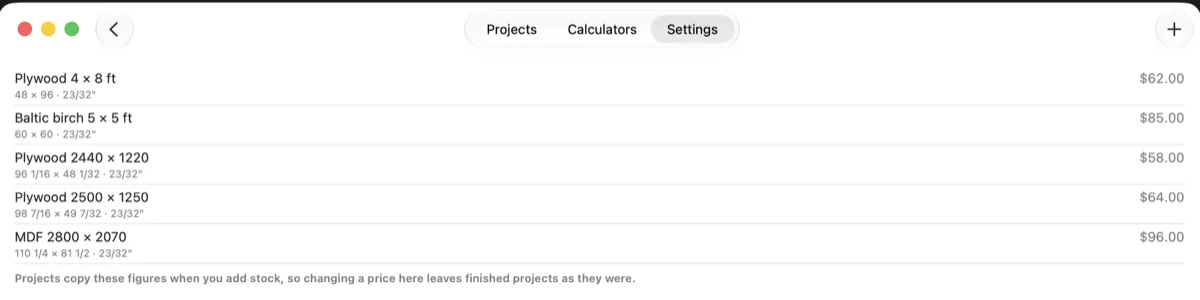
Your own stock list, with the prices you actually pay. Projects copy the figures when you add stock, so changing a price later leaves finished projects as they were.
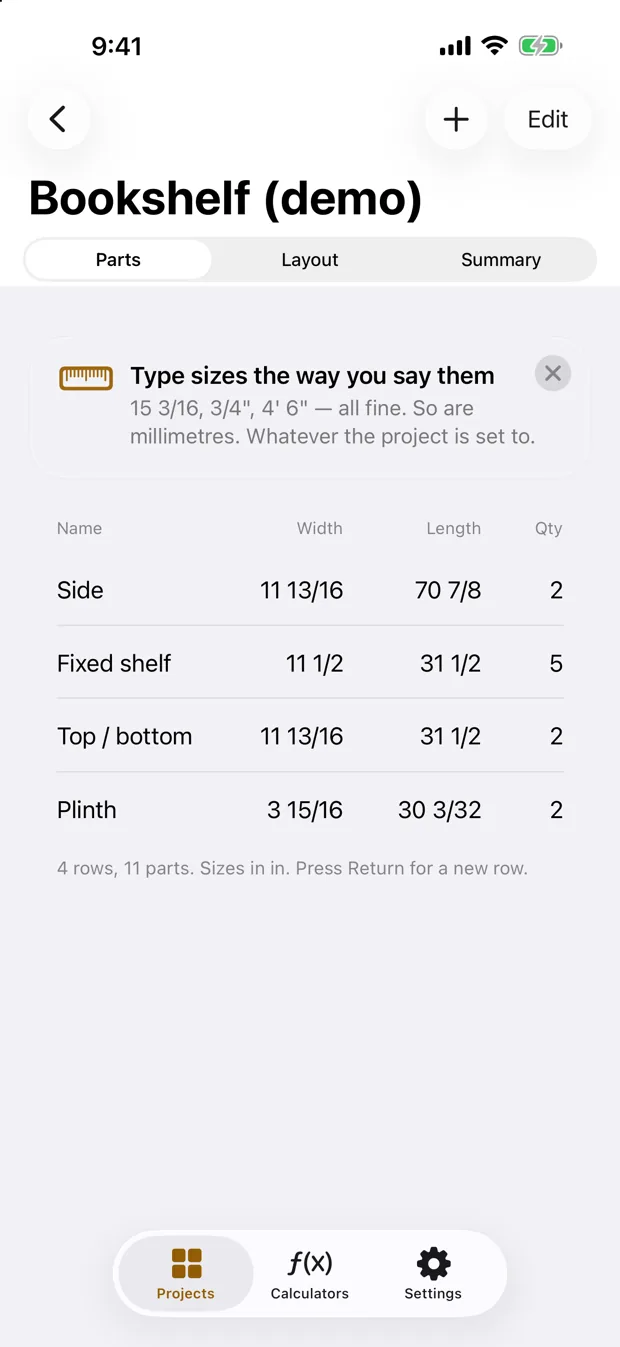
Type sizes the way you say them. Fractional inches, feet and inches, decimals or millimetres — a unit written on a number wins over the project setting.
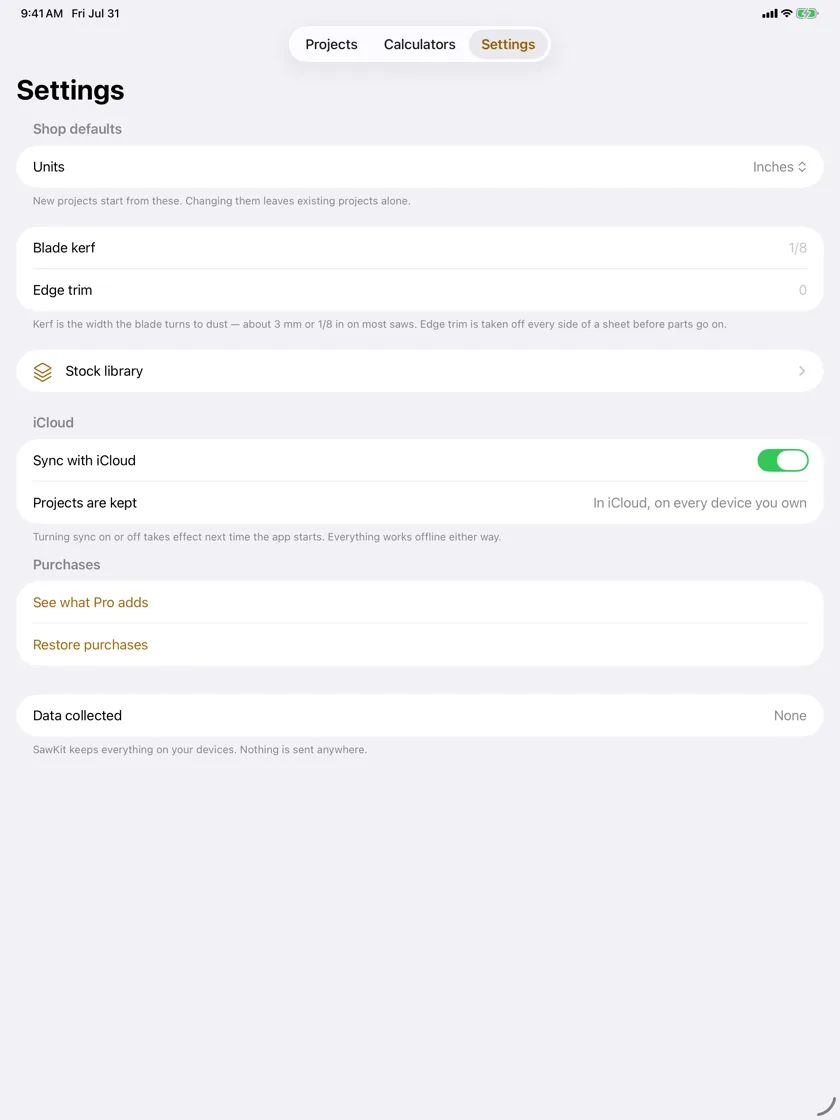
Kerf and edge trim are shop settings, not afterthoughts. And the app states its own privacy answer where you can check it: data collected, none.
A layout is not a plan until you can cut it
Plenty of tools will pack rectangles onto a rectangle. Far fewer will tell you which cut to make first, and whether the piece you are left holding can go through the saw at all.
SawKit derives the sequence, not just the picture. Every cut runs edge to edge across the piece currently on the machine — the only kind of cut a panel saw or a track saw can make in one pass — and they are numbered in the order to make them.
Type sizes the way you say them
Feet and inches, fractions, decimals, millimetres. A unit written on a number always wins over the project setting, so imported hardware drops into a metric project without you converting anything by hand.
- 15 3/1615.1875 in
- 3/4"0.75 in
- 4' 6"54 in
- 385mm385 mm
How good is the layout?
SawKit matches the leading free web optimiser on all eight projects we tested.
That is the whole claim, and it is the one we can show our working for. Eight reference projects were run through both, with the same parts, the same sheets and the same kerf, and the sheet counts came out level on every one.
Underneath, the packing engine carries a property test suite that checks 200 generated projects for non-overlap, sheet bounds, kerf clearance, grain alignment, part conservation and determinism — the same input always produces the same plan.
SawKit went on sale on 13 August 2026. You will not find a rating, a review or a download count quoted on this page — when there are enough to mean anything, the App Store will show them to you directly.
One payment, not a subscription
The calculation runs on your device. There is no server behind SawKit, so there is no rent for us to charge you — and nothing that stops working if we ever stop.
Free
$0
The whole calculation and the layout on screen, plus the shop calculators. Limited to up to 25 parts, 3 projects and one kind of stock.
Pro
$24.99
one payment, not a subscription. Unlimited parts, projects and stock; PDF export and printing; the cut order; your own stock list with prices; your projects synced through your own iCloud.
The shop calculators — board feet with cost, purchase allowance, project cost with markup — are free and stay free.
Nothing is collected
No account, no analytics, no tracking, no advertising, no crash reporter, and no server of ours anywhere. Your cut lists, your stock prices and your projects stay on your own devices. SawKit contains no third-party code at all.
The same goes for this website: no cookies, no analytics, and nothing loaded from anyone else's domain.
Questions
- What does SawKit actually do?
- You type a list of parts — width, height, quantity. SawKit works out how to cut them from full sheets of plywood, MDF or melamine with as little waste as possible, draws the plan sheet by sheet, and tells you the order to make the cuts in. It also prints the plan and a shopping list with prices.
- Which devices does it run on?
- iPhone, iPad and Mac, natively. All three went on sale on 13 August 2026, and they are one App Store record, so SawKit Pro is bought once and works on all of them. It needs iOS, iPadOS or macOS 26 or later.
- Is there a Windows, Android or web version?
- No, and there is no plan for one. SawKit is built for Apple platforms only.
- Is it a subscription?
- No. SawKit Pro is $24.99, one payment, not a subscription. The calculation runs on your device and there is no server behind it, so there is nothing to charge rent for.
- What do I get without paying?
- The whole calculation and the layout drawn on screen, plus the shop calculators, which are free forever. The free version is limited to up to 25 parts, 3 projects and one kind of stock.
- Can I type fractional inches?
- Yes. Type sizes the way you say them — 15 3/16, 3/4", 4' 6" — or in millimetres. A unit written on a number always wins over the project setting, so you can drop imported hardware into a metric project without converting anything by hand.
- Does it account for the saw blade?
- Yes. Kerf and edge trim are part of the calculation rather than a margin you add afterwards. The default kerf is 1/8 inch, or 3 mm in a metric project, and you can change it.
- Does it respect grain direction?
- Yes, and per part rather than per project. You say which way the grain runs on the sheet and which parts have to follow it. Those parts are turned to match instead of being rotated freely to save a few millimetres.
- Can it lay out shapes that are not rectangles?
- No. SawKit plans guillotine cuts: every cut runs edge to edge across the piece in your hands, which is what a panel saw or a track saw can actually do. Nesting curved or irregular shapes is a different job and SawKit does not do it.
- Does it need an internet connection?
- No. Everything happens on the device, so it works with no signal at all. Workshops tend to be the worst room in the building for that.
- What data do you collect?
- None. No account, no analytics, no tracking, no advertising, no crash reporter and no server of ours anywhere. Your cut lists, stock prices and projects stay on your own devices.
- How does it compare to the free tools on the web?
- SawKit is a native app rather than a web page: it works with no signal, it is bought once rather than rented, and it collects nothing about you. On layout quality specifically, the measured comparison is set out under "How good is the layout?" on this page.
Useful whether or not you buy anything
Plywood cut calculator
How many sheets, the waste and every cut for your own parts, with the kerf counted. Free, no sign-up, runs in your browser.
Furniture cut list templates
Every part and the sheet layout from the outside measurements, with a PDF to print: bookshelf, kitchen cabinet, workbench.
Board foot calculator
Board feet and cost from thickness, width and length. Free, no install, nothing sent anywhere.
How to cut a sheet of plywood with the least waste
Where the waste actually goes — the blade, the grain and the order of cuts — and how to get more parts out of the same sheet.
8 best cut list optimizer apps, compared
SawKit, Boardcut, SmartCut, web tools and the Windows classics: what each runs on, what it costs, and who it suits. Ours is marked as ours.
Cut list software compared: what you actually pay
Prices, platforms and payment models taken from each vendor's own site. Ours included, and marked as ours.
Anything else?
Email support@sawkit.app — it reaches the developer directly. The support page covers what happens after you install.